
Do you spend hours painstakingly crafting an email for your new marketing campaign only to get a poor open rate in return?
The number one reason your email isn’t read is because it automatically gets sent to the spam folder by your user’s email provider (Gmail, Outlook, etc.).
According to ReturnPath, one in six permission-based emails don’t reach the inbox. When you are sending emails that you know are relevant to your audience and can offer value, this can be extremely frustrating.
There are two main reasons your emails can get sent to the spam folder:
- Emails are flagged by a spam filter. Spam filters are computer programs – like SpamAssassin – designed to search for certain criteria in email messages and flag the message as spam if it crosses a predetermined threshold. Each email provider has their own top-secret filters that look for: common spam signatures in the email headers, common spam words in the subject and body, high image to text ratios, and more.
- A recipient marks your message as spam. If a reader doesn’t like your message – even if they opted-in – they can send it to the spam folder themselves. If enough people do this, email providers are more likely to classify messages coming from you as spam in the future.
The likelihood of your emails reaching their intended target’s inbox is known as deliverability. Luckily there are many things you can do to try and improve your own email deliverability.
[tweetthis]According to ReturnPath, one in six permission-based emails don’t reach the inbox.[/tweetthis]
1. Get On Your Subscribers’ White List
Nearly all email providers like Gmail, Outlook (Hotmail), Yahoo, and your own ISP, allow you to add specific email addresses to your contacts database (whitelisting). Email sent from these addresses typically bypass the spam folder and is delivered straight to the inbox.
The easiest way to reliably get into your subscribers’ inbox is to ask them to add you to their contacts list. Comm100 suggests asking your subscribers to add you as a contact:
- In the confirmation sign up email
- On the confirmation page
- During most customer service transactions
They suggest adding a line such as “Ensure that you continue to receive quality information from us that you enjoy by adding us to your contact list.”
For example, Melyssa Griffin sends a welcome email after you subscribe to her list. She makes it clear to her new subscribers to add her to your contact list:

You need to be careful, though, as it is possible to be removed from the whitelist if your email gets marked as spam too often.
2. Provide an Out
Make sure you have a clear unsubscribe link in your email – it’s a legal requirement in most jurisdictions, actually. Just because someone has subscribed to your list in the past, it doesn’t mean they will always be interested in what you have to say.
Derek Halpern of Social Triggers has a clear unsubscribe link at the bottom of every email he sends out.

Don’t try to hide your unsubscribe link or use a really small font. If you make it easier for your reader to click unsubscribe than to mark your email as spam, then your sender reputation will reflect this.
3. Test First By Sending to Yourself
Always send yourself a test version of the email before you send it out en masse. If it goes straight to your spam folder then you need to re-evaluate your message.
Bryan Harris of Video Fruit calls this a subject dry-run. He advises to write your subject line as normal and send it to a Gmail account – as the majority of people use Gmail to view their mail.
Gmail does have a Spam folder – which you definitely want to avoid – but you also want to avoid being filtered into your customer’s Promotions tab or folder. Google analyzes emails and, by default, files them into specific folders.
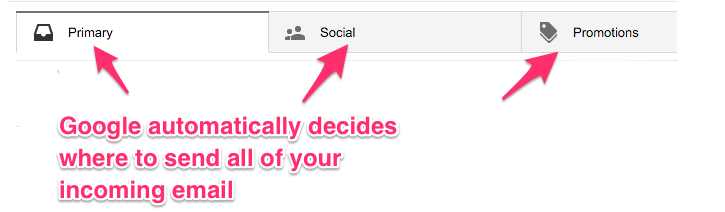
To make a long story short, if your email doesn’t end up in the Primary tab – the inbox – your open rates will suffer. Try rewriting your test email’s subject and/or tweaking its content, and sending again.
When the email finally reaches your inbox, go ahead and send it to your list. When Bryan used this method, he increased his open rate by 75%.
4. A/B Testing
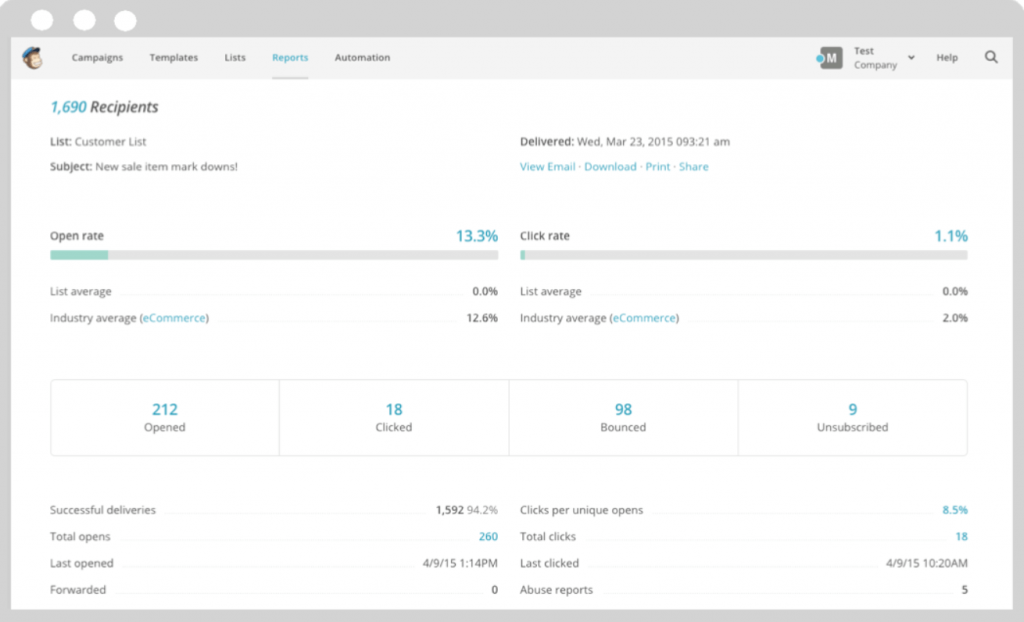
As with any marketing campaign, A/B split testing can help you to see what is working and what isn’t with your email marketing. All good email marketing providers will have a reporting dashboard containing metrics to monitor your campaigns. Check out Mailchimp’s below.
5. Double Opt-in
A double opt-in subscription process means that a subscriber must confirm twice that they want to be added to your list.
[tweetthis]Make sure you have a clear unsubscribe link in your email – it’s a legal requirement in most jurisdictions.[/tweetthis]
First, via an email lead capture form, and secondly in a confirmation email sent directly to their email address. For example, designer Cole from Pines Up North has a free branding course for small businesses. Once you click on his enroll button, a pop-up appears asking you to enter your information.

A few minutes later, you receive an email to confirm your subscription.
The benefits of double opt-in for preventing spam are two-fold:
- You have a high-quality list. Asking visitors to confirm twice shows that they are really interested in what you have to say because they have to go to the effort of clicking once and then opening up an email and clicking again. An engaged readership is much less likely to report your messages as spam compared to those that aren’t as engaged.
- Protection from competitors. In the single opt-in process, anyone can add ANY email address to your list because they don’t need access to that address to confirm. This can lead to underhanded tactics from competitors. Inactive or honeypot email addresses can be added to your list, increasing the chances that you are classified as a spammer.
6. Don’t Assume You Can Send Whatever You Like
Email marketing is a form of Permission Marketing, a phrase coined by Seth Godin.
Permission marketing is “the privilege (not the right) of delivering anticipated, personal and relevant messages to people who actually want to get them.” A good measure of whether or not you are doing this effectively is whether your readers notice when you don’t send anything or “if you stop showing up, people complain, they ask where you went.”
If you take advantage of this permission by sending information that does not add value or is not relevant to the recipient, then you can expect it to be ignored, or worse, marked as spam. With advanced marketing automation technology that’s available – like list segmentation and tagging – there is no excuse for not targeting the right people with each campaign.
7. Comply with the Spam Laws
If you are a business operating (or marketing to people) in the United States and you’re sending “any electronic mail message, the primary purpose of which is the commercial advertisement or promotion of a commercial product or service,” then you must abide by the CAN-SPAM Act 2003. The main requirements are:
- Don’t use false or misleading header information
- Don’t use deceptive subject lines
- Identify the message as an ad
- Tell the recipients where you’re located
- Tell recipients how to opt-out of receiving future email from you
- Honor opt-out requests promptly
- Monitor what others are doing on your behalf
These requirements must be followed, or you could face penalties of up to $16,000 for each offence – that’s $16,000 for each email on your list that you spam.
Most other countries have similar laws, such as Canada’s CASL or Europe’s EU Opt-in directive.
Also, keep in mind as Neil Patel and Ritiki Puri say, don’t think its ok to carry out spam-worthy activity “just because it’s legal.” You will quickly annoy subscribers and be removed from their whitelists.
8. Take Time On Your Subject Line
How you compose your subject line in your campaigns is a huge factor in whether or not you get a high open rate, get ignored, or get marked as spam.
First off, the choice of language is very important. There are certain words and phrases that will trigger spam filters and get your mail sent straight to where you don’t want it to be.
Hubspot has a pretty comprehensive list here divided by areas of business. Here are some words to avoid no matter what sector you operate in:

As well as trying not to trigger the filters, you must also make sure your subject line doesn’t provoke a reader to mark your message as spam before they even open it.
Avoid:
- Writing subject lines in capitals. As Mailchimp says, this is screaming and is just rude.
- Making spelling mistakes.
- Using one-word subject lines such as “Hi.” Even though Barak Obama had success with a “Hey” as an email subject line, it’s not the norm. If you are trying to capture a reader’s attention by being mysterious, Vertical Response recommends asking a question instead. Based on the fact that when tested on social media posts, this method produced 92% more comments.
- Trying to sell. Mailchimp says, “When it comes to email marketing, the best subject lines tell what’s inside, and the worst subject lines sell what’s inside.”
- Being impersonal. Nothing turns a reader off quicker than a generic “Hello unnamed customer” greeting. Jeanne Hopkins says that personalization is “about creating a natural process of conversation between companies and customers”. Talk to your readers like you would if you were one-to-one and face-to-face with them, and you will reap the rewards.
- Pleading with the reader to “Open me!” or “Read me”
9. Getting Off the Blacklist
Having either your sending IP or domain name get put on a blacklist can decimate your email marketing campaign.
There are a number of free services out there you can use to check if you are on such a list.
Some of the biggest blacklists are:
Some are easier to get off of than others. To be removed from them you must contact each specific provider, explain what you’ve done to resolve the situation, and request to be taken off.
This is something your email service provider may handle, but keep in mind, if you do get your providers’ mailing IP addresses put on a blacklist – by being careless with your mailings – you may risk account termination, and fines.
10. Stay Away from Foul Play
Although not seen much anymore, there are a number of old tricks used by email spammers back in the day. However, some naive marketers may read an older article and think some of these things are worth a try. They’re definitely not recommended, and using tricks – or similar ones – like these can cause damage to your reputation. Here’s a small list of things not to do:
- Don’t hide text (that would normally trigger filters) in an image
- Don’t use Re: or Fwd: in the email subject line to trick the reader into thinking that they have already spoken to you about a certain topic
- Don’t make false claims in the subject line
11. Keep Your List Clean
Hubspot sums it up pretty well, “even if your list is entirely built on valid opt-ins, you are at risk of being branded a “spammer” if you don’t practice proper email hygiene.”
Inactive email addresses trigger filters because spammers buy and sell lists that are full of these.
As an extreme example, bad list hygiene – a list of mailing addresses in this case – cost Tennessee Temple University $1,935,000. The University was moving locations and the build costs were considerably higher than expected – over $1.5 milllion more to be exact.
They had to rely on this money being funded by donations. And they were expecting a large amount of these donations to come from alumni on their mailing list. However due to having a poor quality list with outdated contact addresses, only 1 percent of 17,000 alumni responded to their marketing campaign.
12. Watch Your Images
You have to be mindful when including images in your email campaigns – especially if your messages are short. Mailchimp flagged, “too many images, not enough text” as the top reason their emails set off filters.
Spam filters can’t read images so spammers can use them to conceal trigger words that would normally get their email flagged.
A maximum 60/40 text to image ratio is a commonly recommended upper limit. Pardot suggests adding more text than usual if you have to send large/multiple images.
Many email providers and desktop email clients like Outlook block images as standard anyway, so depending on your user base, you may want to consider if sending your image is worth the risk at all.
13. 500 is the Magic Number
A recent study by Email on Acid found that in emails with 500 words or more, “content to image ratio does not affect deliverability.” They believe this is due to the fact that spam messages generally contain 1-3 sentences with a single link in them such as the one below.

14. Dial Down the Excitement
When you’re about to send an email to hundreds or thousands of people it’s easy to get excited about spreading your message.
The problem with this, as pointed out by Neil Patel and Ritika Puri in the Definitive Guide to Marketing Automation is, “what you see as ‘excitement’, your email list will see as excessively obnoxious behavior.” You need to dial it down.
Always focus on the reader when composing emails. Put yourself in their shoes and imagine reading your messages or subject lines for the first time from their perspective.
Case Study 1: Fettke.com
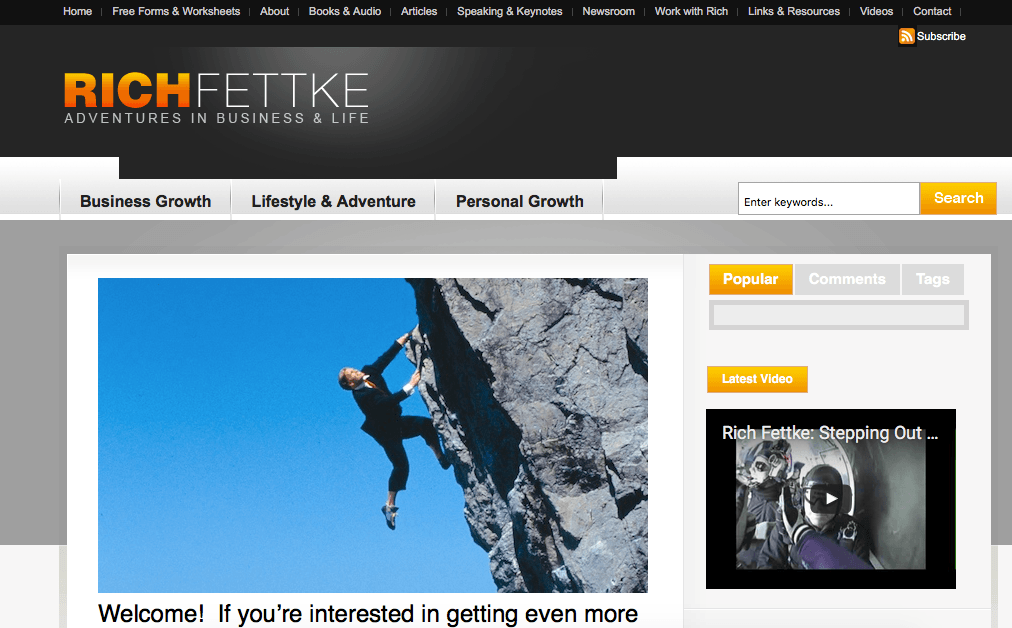
When working with Rich Fettke of Fettke.com, Kristie Tamsevicius increased the delivery rate of his newsletter by 22%.
Rich improved deliverability by implementing three of the steps mentioned above:
- Adding a note telling readers that they could add Rich’s email to their address book to ensure they received the newsletter
- Changed from all-caps to mixed case on the headings and the subject line
- Removed words and phrases that triggered the spam filters
After these adjustments, all 5,538 of Ryan’s subscribers received the email.
Case Study 2: Mailchimp
MailChimp analyzed the open rates of different subject lines from over 200 million emails.
They found that phrases such as, “help,” “% off,” and “reminder” all had a negative impact on open rates. And the amount that went to the spam folder too.
Mailchimp concluded that using localized content such as a city name, lines shorter than 50 characters and phrases framed as questions all performed well and had higher open rates.
Why Pagewiz?
If you are using email marketing to create a funnel for landing pages, then mastering spam folder avoidance can give your traffic a huge boost.
But there’s no point sending this traffic to poorly optimized landing pages that don’t convert. Pagewiz provides landing page templates that can be fully optimized, allowing you to turn as many of your email subscribers into paying customers as possible. Without an effective landing page, you are missing out on sales.
Pagewiz also enables unlimited A/B testing so you can keep testing variables until your pages are converting at the highest rate possible.
Wrapping It Up
There are a number of rules you can follow to reduce the chances of your emails hitting the spam folder. Some of these are technical and some are even enforced by law. But if you are being honest, relevant to your reader and adding value then you are already half-way there.
What are you doing to avoid triggering spam filters when sending your email campaigns?


Elna Cain is a professional writer living in Canada. She works closely with B2C and B2B businesses and has a background in marketing and psychology. She’s been featured on OptinMonster, Social Media Today, Blogging Wizard and is a Huffington Post contributor.
Also published on Medium.