


Every Pagewiz account can be managed by more than one person, if you like.
You can invite another Pagewiz account owner (doesn’t have to be a paid account) to view and manage your landing page campaigns for you. Those ‘others’ are possibly your online marketing agency, or a talented landing pages designer, who can beautify your campaign for you even further.
Start creating your own landing pages with Pagewiz
Watch this short video to understand how you can quickly begin using the ‘ Manage Multiple Client Accounts ’ feature:
If you are an online marketer who runs online landing page campaigns for clients – there’s no need to juggle between various accounts by logging-out and back in again in order to make changes to a certain landing page campaign. You can access as many accounts as you need to, all from within a single account, just as long as you get an invitation to do so, from an account’s owner.
This feature is great news for marketing agencies who run several client campaigns – the Pagewiz ‘Manage Multiple Client Accounts’ feature enables them to manage all their client accounts from one place, with full control. And they don’t even have to have a paid account!
Yep. The MMCA feature is available with no extra cost – and its usage is UNLIMITED. Manage as many client accounts as you want!
Just in case you’re not into video guides, here’s a written version:
How does it work?
To send an invitation for someone to manage your account for you:
- Log in to your account
- Click on ‘Account’ (at the top right hand corner)

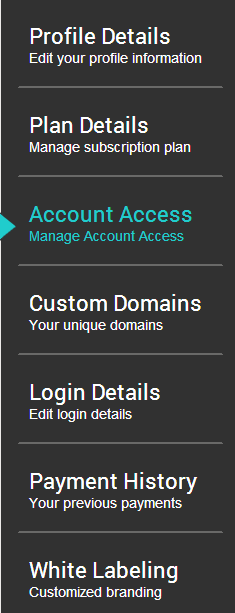
- Choose the ‘Account Access’ tab on the left hand side
- Click the ‘Add Account’ button on the right
- Enter the email address of the person you wish to allow access to, and hit ‘Save’


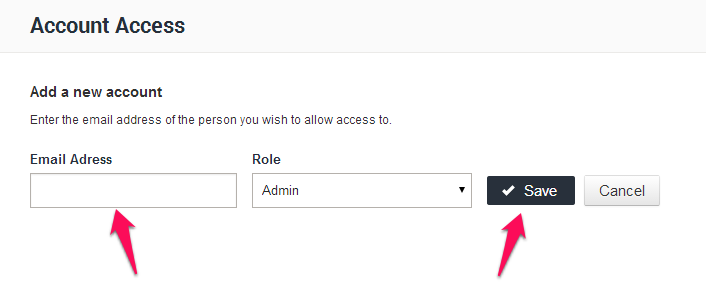
You should now see the following alert appear:

An email invitation is then automatically sent from Pagewiz to the mail address you’ve entered, with a link inside it to confirm that email address:
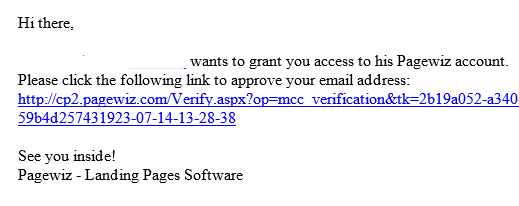
That person will now be able to switch into your account – and manage your landing page campaigns for you, and hopefully, help you achieve a higher conversion rate than ever before!
After access rights are granted – zapping through different accounts is a matter of two clicks of a mouse:
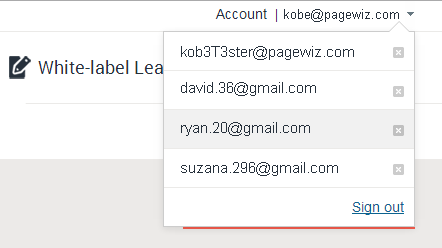
Keep in mind:
You will not lose control over your Pagewiz account once access permission is granted to another person/agency.
You will, of course, still be able to access it with full control, and furthermore, you can easily revoke any access you’ve granted:
Navigating back to the ‘Account Access’ tab, hover over the account you’d like to revoke access from, and click on ‘Revoke Access’.

Access will be revoked immediately.
Enjoy managing all of your clients’ accounts from one place, for free!


Kobe joined Pagewiz as a campaigns manager & front end developer. He has 2.5 years of landing page campaigns creation experience and a passion for driving them towards a higher conversion rate.
On his free time, Kobe likes to go out for long runs along the riverbank, accompanied by his fast dog (Giga).


